Builders Write: A Designer’s Take on Color Fonts for Web Projects
I was staring at a blank Figma canvas, trying to decide whether the hero section of a new coaching website needed to feel serious or approachable. The client wanted energy, but not chaos. They wanted structure with a playful twist. That is when I pulled up Builders Write. It wasn’t just another decorative typeface; it was a full-color font that immediately changed how I thought about visual hierarchy on the page.
As a web designer, I am often cautious about using display fonts in digital layouts. They can look great in a static mockup but fall apart when scaled down for mobile or clash with background images. However, testing Builders Write in a real-world scenario revealed some interesting possibilities for modern typography. This article breaks down my experience integrating this creative font into a live project, focusing on readability, brand identity, and practical implementation.
The First Impression: Structure Meets Playfulness
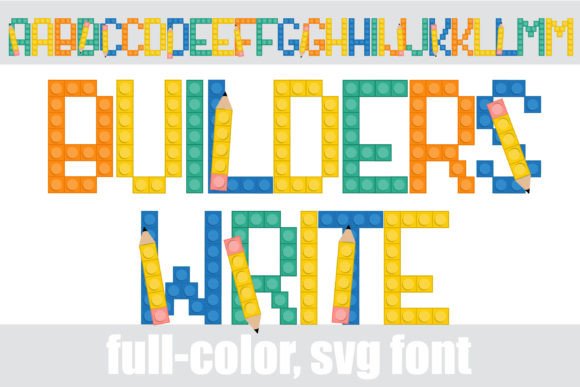
When you first open the character map for Builders Write, you notice the building block style. Each letter looks like a constructed piece, complete with subtle pencil graphics embedded in the design. It has a mood that is both educational and creative. For a brand that sells courses, workshops, or creative tools, this personality is hard to beat.
In my project, I used the standard case for the main headline. The letters sat heavily on the baseline, creating a sense of stability. But what really caught my eye was the alt case. By accessing the additional colors through the system’s character map, I could introduce accents without breaking the layout. Instead of relying on CSS gradients or complex SVG overlays to add color, the font itself carried the palette. This simplified my workflow significantly.
Why Color Fonts Matter in Modern Web Design
Color Fonts are changing how we think about web design assets. Traditionally, adding color to text required multiple layers of styling or image replacement techniques that hurt accessibility and load times. With Builders Write, the color is baked into the glyph. This means:
- Faster Load Times: No need to load extra image files for colored headlines.
- Better Accessibility: Screen readers still read the text correctly because it remains selectable text, not an image.
- Scalability: The font scales perfectly from a massive hero banner to a small button label.
For digital product creators, this is a game-changer. You get the visual impact of a custom illustration with the technical benefits of a standard typeface.
Testing Readability and Visual Hierarchy
The biggest question I had was whether Builders Write would work for body copy. The short answer is no. Like most display fonts, it is too detailed for long paragraphs. However, its strength lies in guiding the user’s eye. In UI design, scanning behavior is critical. Users do not read every word; they scan for keywords.
I used Builders Write exclusively for key phrases in the hero section and section headers. For example, instead of a plain "Start Your Journey" call-to-action, I used "START YOUR JOURNEY" in the alt case. The pencils added a dynamic element that drew attention without being distracting. The visual weight of the block-style letters created a clear contrast against the clean, white space of the background.
On mobile devices, I had to be careful. The blocky nature of the letters can sometimes merge if the line height is too tight. I adjusted the letter-spacing slightly to ensure each "block" remained distinct. This small tweak improved legibility significantly, proving that even fun fonts require thoughtful spacing adjustments for responsive layouts.
Font Pairing Strategies
To balance the heaviness of Builders Write, I paired it with a simple sans serif font for body text. Let’s say you choose a geometric sans-serif for your paragraph copy. The contrast between the structured, colorful display font and the neutral, readable body text creates a professional yet friendly tone. This combination works exceptionally well for:
- Course Sales Pages: Where you need to grab attention quickly but maintain credibility.
- Boutique Online Stores: Where product names need to stand out against descriptions.
- Portfolio Homepages: Where personal branding needs to feel unique but not overwhelming.
If you prefer a more editorial look, pairing Builders Write with a modern serif font can create a sophisticated juxtaposition. The pencils suggest creativity, while the serif suggests tradition. This mix is perfect for brands that want to highlight craftsmanship or artisanal quality.
Practical Applications Across Digital Assets
Once I confirmed Builders Write worked well in the hero section, I expanded its use across the site. Here is how I applied it in different areas:
Landing Pages and Campaigns
For a promotional landing page, I used the font for short, punchy phrases like "LIMITED SPOTS" or "NEW DROP." The alt case allowed me to use red and blue accents naturally, aligning with the campaign’s color scheme without manual editing. This consistency strengthened the brand identity and made the page feel cohesive.
Social Media Graphics and Ads
Because Builders Write is a premium font with built-in color, it saved hours of design time for social media assets. I exported headlines directly from my design tool as text, ensuring they were crisp on all screen sizes. Whether creating Instagram stories or Facebook ads, the font maintained its integrity. The pencils added a handcrafted feel that resonated well with audiences tired of sterile, corporate templates.
Digital Brand Kits
For clients building a new online presence, I recommended Builders Write as part of their core typography kit. It serves as the accent font for logos, packaging design elements, and email headers. Its versatility allows it to bridge the gap between digital screens and physical print, ensuring a unified design aesthetic.
Technical Considerations for Implementation
Before launching the site, I checked several technical details to ensure smooth performance:
- File Formats: I verified that the font supported WOFF2 format for optimal web loading speeds.
- Multilingual Support: I tested accented characters to ensure the alt case colors remained consistent across different languages.
- Commercial Licensing: I confirmed the license allowed usage on websites and digital products, avoiding any legal issues later.
One tip for other designers: always test the font on dark backgrounds. While the light version of Builders Write popped beautifully on white, the darker alt cases needed slight brightness adjustments to remain visible. Using a subtle drop shadow or ensuring high contrast ratios helped maintain accessibility standards.
Final Thoughts on Builders Write
Builders Write is more than just a novelty font. It is a strategic design asset that can elevate a website’s visual appeal while maintaining technical efficiency. For web designers looking to add personality to their layouts without compromising on performance, this creative font offers a compelling solution. Whether you are designing a portfolio, an e-commerce store, or a course platform, Builders Write provides the structure and color needed to make your content stand out in a crowded digital landscape.