Udderly Fall Typeface: A Designer’s Take on Color Fonts for Web
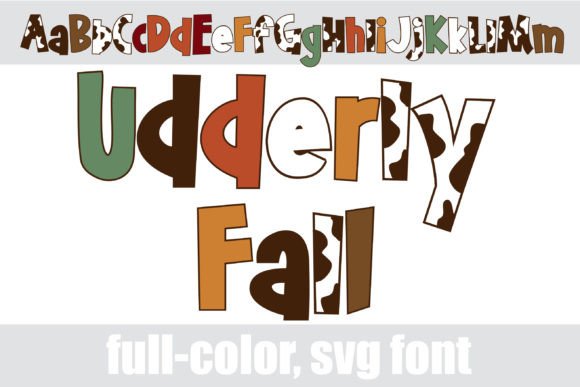
I was staring at a blank hero section, trying to inject some seasonal warmth into a coaching website redesign without making it look like a discount flyer. The client wanted "cozy," "approachable," and "distinctive." Standard serif fonts felt too corporate, and basic sans serifs were losing their personality in the sea of minimalist web design. That is when I pulled up Udderly Fall. It wasn’t just another decorative typeface; it was a full-color font that promised a mix of fall colors and cow prints, which sounded chaotic until I actually tested it in the layout.
First Impressions in the Hero Section
The moment I dragged the font file into my design software, the difference was immediate. Unlike traditional monochrome fonts, this is a true Color Font, meaning the glyphs carry their own visual texture and palette. I dropped the main headline text over a soft, blurred background image of autumn leaves. Usually, complex backgrounds fight with decorative headers, but Udderly Fall handled the contrast beautifully. The alt case, accessible through the system character map, introduced those unexpected cow print accents and varied hues that broke the monotony of standard typography.
For a digital creator, seeing a font that does the heavy lifting of illustration is rare. Instead of layering multiple graphic elements or using heavy CSS filters to achieve a "fall" vibe, the typography itself became the focal point. It felt playful yet intentional. However, I quickly realized that while it works wonders for impact, it requires strategic placement. You cannot use this for body copy. The eye needs rest, and a cow-printed paragraph would be visually exhausting within seconds.
Building Visual Hierarchy with Display Typography
In web design, hierarchy dictates how users scan content. Udderly Fall excels as a display font for short phrases. I used it for the primary call-to-action area on the landing page, specifically for the button text and the subheadline above it. Because the font features a fun sans serif base, it retains legibility even with its colorful embellishments. This is crucial for accessibility and user experience (UX). If a user has to squint to read your offer because the font is too busy, you lose trust immediately.
I paired Udderly Fall with a clean, neutral sans serif font for the supporting text. This contrast is a classic technique in modern typography. The decorative nature of the color font draws attention, while the simple body copy ensures readability. By keeping the body text in a standard weight and color, the design feels balanced. The Udderly Fall headings act as visual anchors, guiding the user’s eye down the page toward the conversion points. It creates a rhythm: excitement from the header, clarity from the content.
Readability Across Devices
Testing responsive layouts is where many creative fonts fail. On mobile screens, space is at a premium. I resized the Udderly Fall headlines to fit smaller viewports. The key here was reducing the size appropriately. When scaled down too far, the intricate details of the color fills can blur or become indistinguishable. I found that keeping the headline size substantial—large enough to showcase the color variations but small enough to fit the screen—was the sweet spot. For very small buttons or navigation links, I switched back to the standard sans serif. Using Udderly Fall only for larger, high-impact areas ensured that the site remained fast-loading and crisp on all devices.
Enhancing Brand Identity and Engagement
This font isn’t just about aesthetics; it’s about brand voice. For a boutique online store selling handmade goods or a creative portfolio, Udderly Fall signals creativity and approachability. It tells the visitor that the brand is human and thoughtful. In my test project, the coaching website, the font helped soften the professional tone, making the expert feel more relatable. It added a layer of emotional connection that standard fonts often miss.
Furthermore, the inclusion of multiple weights and alternate characters allows for dynamic design assets. I used the alt cases for pull quotes and social media graphics derived from the site. This consistency across platforms strengthens brand recognition. When a user sees the same distinctive typographic style on the website banner and the Instagram post, it reinforces the brand identity. It transforms a static website into a cohesive digital experience.
Practical Applications for Digital Products
- Landing Pages: Use Udderly Fall for the main value proposition headline to grab attention instantly.
- Email Campaigns: Incorporate it in email headers to increase open rates through visual interest.
- Digital Templates: Include it in Notion templates or PDF guides as a decorative accent for section dividers.
- Social Media Banners: Create eye-catching headers for LinkedIn or Facebook pages that stand out in crowded feeds.
Technical Considerations for Implementation
Before deploying Udderly Fall to a live site, there are technical checks every designer must perform. First, verify the file formats. Ensure you have the correct OpenType or WOFF2 files that support the color layers properly across different browsers. Some older browsers may not render color fonts correctly, so having a fallback plan is wise. Check the commercial licensing terms carefully. Since this is a premium font, ensure your usage rights cover web embedding, especially if you are building this for a client.
Also, consider the load time. While modern webfonts are optimized, adding multiple weights and color data can slightly increase file size. Use lazy loading for non-critical fonts if necessary, though hero fonts should load early to prevent layout shifts. Testing the font in dark mode is also essential. The bright fall colors might need adjustment against dark backgrounds to maintain contrast ratios required by WCAG guidelines. In my testing, the lighter shades of the alt case worked well on dark themes, providing a striking yet readable effect.
Conclusion for the Modern Creator
Udderly Fall proved to be more than just a seasonal gimmick; it was a functional tool for enhancing digital storytelling. It demonstrates how color fonts can elevate a website from plain to polished without requiring extensive graphic design skills. For web designers and UI creators looking to add personality to their projects, integrating a high-quality display font like this can significantly improve engagement and brand perception. Just remember to use it sparingly, pair it wisely, and always prioritize the user’s ability to read and navigate your content. In the world of web design, beauty and function must coexist, and Udderly Fall manages to do both with charm and clarity.