Udderly Scary: A Practical Review of This Halloween Color Font
I opened a blank brand board on my monitor, the cursor blinking in the top left corner. It was 7 PM on a Tuesday, and I was working on a quick visual refresh for a local artisanal bakery that wanted to lean into their spooky seasonal pop-up. They didn’t want generic pumpkins or standard orange-and-black stripes. They wanted something playful, slightly absurd, and undeniably memorable. That’s when I pulled Udderly Scary from my font library.
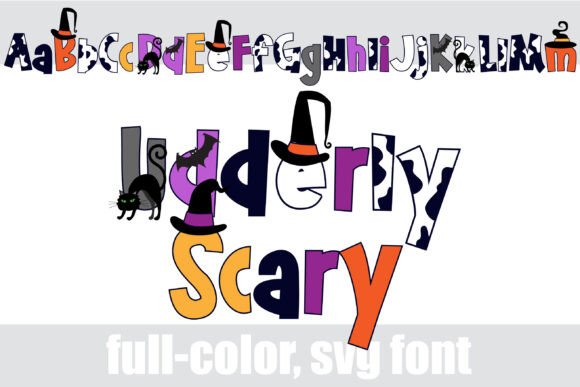
This isn’t just another holiday typeface. As a full-color font, it operates differently than traditional monochrome typefaces. When I dragged it onto the canvas, the letters didn’t just sit there; they popped with a chunky sans serif structure filled with a vibrant Halloween color palette. But what really caught my eye was the cow print integration. It’s unexpected, humorous, and perfectly suited for a brand that wants to wink at its audience rather than scare them. In this review, I’m breaking down how Udderly Scary performed across logo drafts, packaging mockups, and social media layouts, so you can decide if it belongs in your creative toolkit.
First Impressions: Personality Meets Pixel
The moment you place Udderly Scary on a design asset, the personality is undeniable. It is a display font through and through, designed to grab attention rather than recede into the background. The "chunky" description in its specs is accurate; the letterforms are bold and substantial, giving it a heavy presence that works well for headlines and short phrases.
What makes this font stand out among other Color Fonts is the complexity of the fill. Unlike simple gradient fonts, this one features intricate patterns—specifically the cow print mixed with classic Halloween motifs like bats, ghosts, and candy corn hues. It requires a system that supports OpenType SVG or COLR/CPAL layers to render correctly. Fortunately, most modern design software handles these Fonts seamlessly. However, I did notice that when testing it in older versions of certain vector programs, the colors sometimes flattened. Always check your rendering environment before finalizing client deliverables.
The mood is lighthearted and festive. It doesn’t feel eerie or dark; instead, it feels like a fun costume party. For a bakery or a craft shop, this tone is ideal. It invites engagement without demanding seriousness. If you were designing for a horror movie poster or a heavy metal band, this would be the wrong choice. But for commercial branding that needs to be approachable, it hits the sweet spot.
Testing in Real-World Branding Contexts
To truly understand the utility of Udderly Scary, I moved it beyond the initial concept phase and applied it to various practical scenarios. Here is how it held up under scrutiny.
Logo Design and Brand Identity
In logo design, simplicity usually wins. Udderly Scary is not simple. Its detailed fill means that at very small sizes, the cow print and Halloween elements can muddy together, losing their distinct shapes. I tested it as a primary logo mark for a business card, and while it looked striking at large scale, the details got lost when printed at 2 inches wide. It works best as an accent logo or a secondary mark used alongside a cleaner, simpler sans serif font. For a main logo, it risks overwhelming the viewer unless the brand name itself is very short.
Packaging Design and Product Labels
This is where the font truly shines. I placed Udderly Scary on a mockup for a jar of seasonal candle wax. The chunky letters contrasted beautifully against the matte black label, and the colorful interior of the letters drew the eye immediately. Because it is a decorative font, it served as both typography and illustration. Instead of adding separate clip art of cows or pumpkins, the font itself provided the visual interest. This reduced clutter on the package and kept the design cohesive. For product labels, especially for limited-edition holiday items, this font saves time by combining text and imagery into one element.
Social Media Graphics and Web Headers
For social media graphics, particularly Instagram posts or Facebook banners, Udderly Scary commands attention in a crowded feed. I created a series of promotional posts using the font for key words like "Spooky," "Sweet," and "Sale." The alt version accessible through the system’s character map allowed me to swap out specific glyphs, which helped customize the message further. On web design headers, it worked well for hero sections where the headline is large and the background is clean. However, I found that pairing it with a busy background image made the text hard to read. Use ample negative space around this typeface to let it breathe.
Font Pairing and Hierarchy
No font exists in isolation. One of the biggest challenges with a loud, patterned display font like Udderly Scary is balancing it with supporting typography. You need a typeface that can handle the workload of body text, navigation menus, and legal disclaimers without competing for attention.
I paired Udderly Scary with a clean, neutral sans serif font for subheadings and body copy. This created a strong visual hierarchy. The chunky, colorful font acted as the headline, while the understated sans serif provided clarity and readability. Avoid pairing it with a serif font that has high contrast or ornate details, as the two might clash stylistically. Similarly, a script font could work for a handwritten touch, but only if the script is simple and legible. The goal is to let Udderly Scary be the star while the supporting cast remains professional and functional.
When building a modern typography system around this font, consistency is key. Use Udderly Scary sparingly. Treat it as an accent font. Using it for long paragraphs will fatigue the reader’s eyes due to the visual noise of the pattern. Reserve it for titles, pull quotes, buttons, and short promotional phrases.
Technical Considerations and Limitations
Before integrating Udderly Scary into your final projects, there are a few technical aspects to keep in mind. First, verify the file formats included. As a premium font, it should come with OTF, TTF, and potentially WOFF/WOFF2 files for web use. Ensure that your web developer knows how to implement color fonts via CSS, as support varies across browsers. While Chrome, Safari, and Firefox have robust support, some older email clients may strip the color, reverting the text to black. In such cases, always provide a solid-color fallback image or text style.
Readability is the primary limitation. Do not use this font for fine print, terms and conditions, or dense editorial design. It lacks the subtlety required for long-form reading. Additionally, check the character map thoroughly. The alt versions mentioned in the description are useful for customizing messages, but they may not include every punctuation mark or special symbol you need. Test all necessary characters before starting a large project.
Final Verdict for Creators
Udderly Scary is a specialized tool, not a general-purpose workhorse. It excels in niche applications where humor, festivity, and visual impact are prioritized over strict minimalism. For brand designers looking to add a touch of whimsy to a brand identity, or for marketers creating eye-catching social media graphics, this font delivers exactly what it promises.
It is important to remember that even though the font is visually engaging, proper licensing still applies. Check the commercial font license carefully. Most creative fonts allow use in digital marketing and limited print runs, but merchandise production or template resale may require an extended license. Always review the commercial font agreement to avoid legal issues later.
If you are planning a Halloween campaign, a quirky bakery rebrand, or a playful product launch, give Udderly Scary a test drive. Place it on a mockup, pair it with a clean sans serif, and see how it elevates your design assets. Just remember: let it shine as a headline, not as the foundation of your entire typographic system.