Mother Hen: A Color Font Review for Editorial Design
I was sitting at my desk last Tuesday, staring at a blank InDesign canvas, trying to solve a very specific problem. I had just finished typesetting a thirty-page digital workbook for a wellness coach, and the content was solid, but the visual identity felt flat. The client wanted something that felt nurturing, approachable, and distinctly "handmade," yet it still needed to maintain professional credibility. Standard script fonts felt too chaotic, and clean sans serifs felt too cold. That is when I pulled Mother Hen from my library of color fonts.
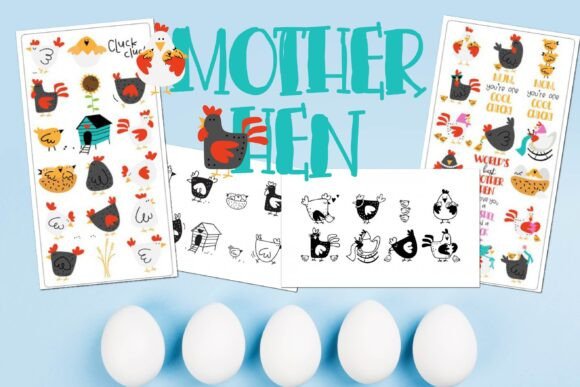
This wasn't just about finding a pretty typeface; it was about finding a tool that could bridge the gap between warmth and structure. Mother Hen, paired with its companion character Chicken Little in this bundle, offered exactly what I needed. It is a full-color font that allows for immediate visual storytelling without requiring complex graphic design skills or external illustrations. Here is how Mother Hen performed in a real-world editorial layout, and why it might be the missing piece in your own design projects.
The Visual Character and Mood
When you first open the file, the personality of Mother Hen is undeniable. It sits comfortably in the realm of a handwritten font but with enough structural integrity to feel grounded. Unlike many script fonts that can become illegible at smaller sizes, Mother Hen retains a clear x-height and open counters. This makes it surprisingly versatile for editorial use. The color layering is soft—earthy tones that evoke comfort rather than shouting for attention.
In typography, mood is everything. For a publication focused on lifestyle, parenting, or creative coaching, the right typeface sets the emotional stage before the reader processes a single word of body copy. Mother Hen brings a sense of calm authority. It feels like a letter written by a trusted friend, which is precisely the kind of relationship content creators strive to build with their audience. The alternates included in the bundle allow you to introduce slight variations in color and form, preventing the text from looking monotonous while maintaining a cohesive brand voice.
Testing in Real Layouts: From Headers to Pull Quotes
I applied Mother Hen across several different elements of the workbook to see how it held up under pressure. Here is how it functioned in each context:
- Blog Headers and Titles: When used as a main title for an article or ebook chapter, Mother Hen commands attention without overwhelming the page. Its bold, colorful strokes create an immediate focal point. Because it is a display font, it excels in large sizes where every detail of the color application can be appreciated.
- Pull Quotes: One of the most effective uses for this font is in pull quotes. By extracting a key sentence from the body text and setting it in Mother Hen, I was able to break up dense paragraphs and encourage scanning. The color variety helped these quotes pop against the white background, guiding the reader’s eye down the page.
- Newsletter Graphics: For a weekly creator newsletter, I used Mother Hen for the subject line preview and the header image text. It added a touch of personality that made the email feel less like a corporate broadcast and more like a personal note. This small shift in brand identity can significantly impact open rates and engagement.
- Printable Planners: In the actual worksheet layouts, I used it sparingly for section dividers and instructional headers. It provided a nice contrast to the functional, grid-based nature of the planner, reminding the user that the process should be enjoyable, not just efficient.
It is important to note that Mother Hen is best suited for short bursts of text. While its charm is evident, it is not designed for long-form reading. Using it for body copy would fatigue the reader quickly due to the visual complexity of the colored glyphs. Instead, treat it as a premium accent—a creative font that elevates specific moments in your design.
Readability and Technical Considerations
As editors and designers, we must always prioritize readability. Mother Hen handles this well within its intended scope. However, there are technical nuances to consider when integrating color fonts into your workflow.
First, ensure your target platform supports OpenType-SVG or COLR/CPAL font formats. Most modern web browsers and design software like Adobe InDesign and Illustrator handle these beautifully. However, if you are exporting to PDF for print, double-check that the colors embed correctly. In my experience, Mother Hen exported cleanly, retaining its vibrancy on both screen and paper.
For mobile layouts, test the font at various viewport widths. Because the letters have intricate details, shrinking them too far can cause the colors to blur or merge, reducing legibility. I found that keeping Mother Hen above 24pt for digital screens ensured that the nuance of the design remained intact. For captions, footnotes, or dense informational blocks, stick to a reliable serif font or a clean sans serif font. These neutral partners will let Mother Hen shine as the star without competing for attention.
Font Pairing Strategies
The secret to successful font pairing lies in contrast. Since Mother Hen is expressive and decorative, it pairs best with understated, highly readable typefaces. In the workbook project, I paired it with a classic humanist serif for the body text. This combination worked because the serif provided stability and rhythm, allowing the eye to rest, while Mother Hen provided bursts of energy and emotion.
Another effective strategy is to pair it with a geometric sans serif font for subtitles or navigation elements. This creates a modern, balanced look that feels contemporary yet warm. Avoid pairing it with other scripts or heavily stylized fonts, as this can create visual clutter and confuse the hierarchy of information. The goal is clarity, and Mother Hen achieves this by being the clear leader in the typographic family.
Licensing and Practical Usage
Before incorporating Mother Hen into any commercial project, whether it is a paid course, a client magazine, or a template sold on marketplaces, always review the licensing agreement. As a commercial font, it may have restrictions on the number of end users or specific uses such as logo design. Ensure you have the appropriate license for your needs.
Check the included styles carefully. Does the bundle offer multiple weights? Are there ligatures or special characters that enhance your design options? Mother Hen’s strength lies in its versatility within the color space, so exploring all the alternates can save you time on graphic assets. If you are creating design assets for resale, having a comprehensive font bundle reduces your reliance on external illustrations, streamlining your production process.
Final Verdict
Mother Hen is more than just a decorative typeface; it is a mood setter. It understands the delicate balance between professionalism and personality that modern editorial design demands. Whether you are redesigning a blog, creating a wedding guide, or building a digital magazine, this font offers a ready-made solution for adding warmth and visual interest. It respects the reader’s need for clarity while delighting the eye with thoughtful color and form. For anyone looking to inject a bit of soul into their modern typography, Mother Hen is a worthy addition to the toolkit.