Looking Remarkable: A Whimsical Color Font for Editorial Design
There is a specific moment in every design project when the structure feels solid, but the soul is missing. I was recently working on a redesign for a lifestyle newsletter that focused on slow living and creative hobbies. The layout was clean, the imagery was high-quality, and the navigation was intuitive. Yet, the header felt sterile. It lacked the warmth of a handwritten note or the playful energy of a craft table scattered with supplies. That was when I decided to test Looking Remarkable, a full-color font that promised to bring color markers to life directly into the text.
This wasn’t just about picking a pretty typeface; it was about solving a visual hierarchy problem. How do you make a digital headline feel tactile without sacrificing readability? The answer lay in understanding the unique rhythm of this whimsical, crafty font. By integrating Looking Remarkable into my editorial workflow, I found a way to bridge the gap between professional design and personal expression.
The Visual Personality of Looking Remarkable
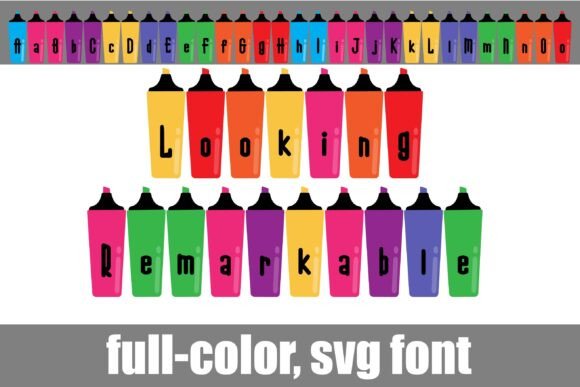
At first glance, Looking Remarkable appears to be a standard script or handwritten font, but its true power lies in its construction as a Color Font. Unlike traditional monochrome typefaces that rely on bolding or italics for emphasis, this font features an alt case of additional colors for each letter. This means you can access different color variations through your system’s font menu or within design software like Silhouette Studio. The result is a dynamic, multi-hued appearance that mimics the look of colorful markers or crayons.
The mood is undeniably cheerful and approachable. It has a casual, unpretentious vibe that works exceptionally well for brands that want to appear friendly and accessible. However, there is a refined edge to the strokes. It isn’t messy; it is intentionally crafted. This balance makes it suitable for more than just children’s party invitations. In an editorial context, it serves as a powerful tool for grabbing attention while maintaining a sense of curated charm.
Real-World Applications in Digital Publishing
I integrated Looking Remarkable into several key areas of my recent content projects to see how it performed under real-world constraints. Here is how it transformed specific elements:
- Blog Headers and Feature Pages: For the main banner of my "Creative Corner" blog section, I used the font for the title. The varying colors added depth to the flat design, making the header pop against a neutral background without needing heavy graphic overlays.
- Ebook Covers: When designing a cover for a printable guide on watercolor basics, the font provided instant visual interest. The marker-like texture suggested creativity and hands-on learning, which aligned perfectly with the subject matter.
- Newsletter Graphics: In weekly email newsletters, subject lines and pull quotes are critical. Using Looking Remarkable for pull quotes broke up the dense body text and invited the reader to pause and engage with the highlighted message.
- Printable Planners and Worksheets: For a coaching workbook, I used the font for section headers. It helped organize the content visually, guiding the user through the exercises with a friendly, encouraging tone.
These applications demonstrate that the font is versatile. It is not limited to one niche. Whether you are creating social media graphics, packaging designs, or web design elements, the ability to shift colors allows for endless customization.
Readability and Screen Considerations
One of the most common questions designers ask is whether a decorative font is readable on screens. The short answer is: it depends on how you use it. Looking Remarkable is best utilized as a display font. It excels at titles, subtitles, chapter openers, and decorative accents. It is not recommended for long-form body copy. Trying to read paragraphs of text in a marker-style font would fatigue the reader’s eyes and hinder comprehension.
However, when used for shorter text blocks—such as article titles, magazine covers, or logo design—the font performs beautifully. On mobile layouts, where screen space is limited, the vibrant colors help the text stand out even at smaller sizes. For PDF exports and print materials, the color fidelity remains sharp, ensuring that the intended mood is preserved in physical copies of your guides or workbooks.
To maintain a good reading experience, I always pair Looking Remarkable with a highly legible serif font for body copy or a clean sans serif font for captions and navigation. This contrast creates a clear visual hierarchy. The eye is drawn first to the colorful, whimsical headlines, then flows smoothly down to the structured, easy-to-read body text. This combination ensures that your publication identity remains consistent while keeping the audience engaged.
Font Pairing Strategies
Successful editorial design relies on harmony. Here are two effective pairing strategies I tested:
- With a Modern Serif: Pairing the playful markers with a classic serif font adds a touch of sophistication. This works well for wedding guides or high-end lifestyle blogs where you want to balance fun with elegance.
- With a Geometric Sans Serif: Using a clean, minimal sans serif font alongside Looking Remarkable creates a contemporary, youthful look. This is ideal for course PDFs, digital magazines, or creator newsletters targeting a younger demographic.
Technical Details and Licensing
Before incorporating any premium font into your commercial projects, it is essential to review the technical specifications. Looking Remarkable comes as a Color Font, which means it supports advanced typography features. You should check for included styles, alternates, ligatures, and weights to ensure you have enough variety for your layout needs. Multilingual support is also a crucial factor if your audience spans different regions.
Furthermore, always verify the file formats available. Most modern design tools support OpenType SVG fonts, which allow for the rich color palette this font offers. If you are using vector software like Silhouette, ensure compatibility for cutting or precise editing.
Licensing is another critical step. While many fonts are free for personal use, commercial usage—such as selling ebooks, templates, printables, paid newsletters, client publications, or digital downloads—requires a commercial license. Always read the end-user license agreement (EULA) to understand the scope of permitted use. This protects your brand and respects the designer’s intellectual property.
Why Typography Matters in Content Branding
In the crowded landscape of digital content, typography is often overlooked. We focus heavily on images and copy, forgetting that the way words are presented shapes our emotional response to them. Looking Remarkable reminds us that fonts are not just containers for letters; they are carriers of mood and personality.
By choosing a creative font that aligns with your brand identity, you create a more immersive experience for your readers. It signals that you care about the details. It shows that your content is crafted with intention. Whether you are building a brand identity for a new startup or refreshing an established blog, the right typeface can elevate your design from functional to memorable.
As I finalized my newsletter redesign, the difference was palpable. The header no longer felt like a static label; it felt like an invitation. The colors danced across the screen, mirroring the creative spirit of the articles within. This small change in typography had a significant impact on the overall aesthetic, proving that thoughtful font choice is indeed remarkable.
If you are looking to add a touch of whimsy and color to your next project, consider testing Looking Remarkable. Experiment with its alt cases, play with its placement, and observe how it influences the reader’s journey. In the world of editorial design, sometimes all it takes is a splash of color to make your message truly stand out.