Pastel Curve Review: A Designer’s Take on This Color Font
When a new typeface lands in my inbox, I rarely jump straight into the design software. First, I look at it. I let the shapes settle. With Pastel Curve, that initial pause was longer than usual. It is not just another decorative display font; it is a mood setter. As a designer who has spent years balancing client demands with aesthetic integrity, I find myself drawn to tools that offer immediate personality without sacrificing structural intelligence. Pastel Curve delivers exactly that, but its utility extends far beyond simple decoration.
The First Impression: Softness Meets Structure
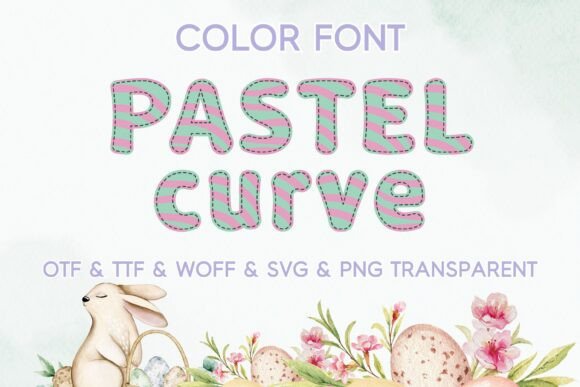
The moment you open the file, the name tells the story. The curves are gentle, inviting, and undeniably soft. However, do not mistake this for fragility. There is a confident backbone to the letterforms. In an era where modern typography often swings toward sharp geometric minimalism or aggressive bold weights, Pastel Curve offers a refreshing counter-narrative. It feels like a deep breath. It creates an atmosphere of calm sophistication, which is a rare commodity in visual communication today.
This is a color font, meaning it carries built-in graphical elements within the glyphs themselves. For designers, this changes the workflow entirely. You are no longer layering multiple text boxes to create a single effect; the complexity is baked into the type. This reduces file bloat and ensures consistency across platforms, provided your target software supports OpenType color features. The visual personality here is playful yet polished. It does not scream for attention; it whispers with authority. It belongs naturally in projects that require warmth, approachability, and a touch of premium elegance.
Real-World Application: Where Does It Shine?
I have tested Pastel Curve across a spectrum of real-world scenarios, from high-stakes brand identity work to quick-turnaround social media assets. Here is how it performs when the pressure is on.
- Logo Design and Brand Identity: This is perhaps its strongest suit. The unique character details make it an excellent choice for boutique brands, lifestyle businesses, and creative agencies. When used as a primary mark, it establishes a distinct voice immediately. However, because it is a display font, it works best for short names or wordmarks rather than long company titles.
- Packaging Design and Product Labels: If you are designing for cosmetics, skincare, artisanal foods, or gift items, this font elevates the perceived value. The soft curves mimic the tactile experience of luxury goods. On a shelf, it stands out against rigid sans serif competitors by offering organic movement.
- Social Media Graphics and Digital Ads: In the noisy feed of Instagram or Pinterest, Pastel Curve grabs attention through its novelty. It is perfect for quote graphics, promotional banners, and event announcements. Its readability holds up well even at smaller sizes on mobile devices, which is critical for engagement.
- Editorial Design and Blog Graphics: For content creators and publishers, it serves as a stunning headline font. It breaks the monotony of standard web typography. Pairing it with a clean body text allows the header to carry the emotional weight while the body remains functional.
- Digital Products and Printable Design: Designers selling templates on platforms like Etsy or Creative Market will find immense value here. It is versatile enough for wedding invitations, greeting cards, and printable wall art. Its commercial font status makes it a safe investment for sellers looking to diversify their design assets.
Strategic Pairings and Hierarchy
No typeface exists in a vacuum. The true test of a typeface is how well it collaborates with others. Pastel Curve is bold enough to stand alone, but it shines brightest when paired correctly. My recommendation is to treat it as a partner, not a soloist.
Because Pastel Curve has significant visual weight and decorative detail, it requires a neutral anchor. A clean sans serif font is the safest bet for body copy. Look for geometric or humanist sans serifs that share a similar x-height ratio to maintain harmony. Avoid pairing it with another script font or handwritten font; the competition for attention will result in visual chaos. Similarly, while a classic serif font can work, it risks feeling dated unless the contrast is extreme. The goal is balance: let Pastel Curve provide the personality, and let the supporting font provide the clarity.
Where to Exercise Caution
Even the best fonts have limitations. Pastel Curve is not a Swiss Army knife; it is a specialized tool. Understanding where it struggles is as important as knowing where it succeeds.
- Large Blocks of Text: Do not use this for paragraphs. The decorative elements within the letters will fatigue the reader’s eye quickly. It is strictly for headlines, subheads, and short phrases.
- Small Sizes: While decent for mobile headers, it loses its charm when scaled down too small. On business cards or fine print, the intricate details may blur or disappear, leaving a muddy appearance.
- Corporate and Legal Contexts: If you are designing for law firms, financial institutions, or healthcare providers, this font may undermine the perception of stability and seriousness. It is too whimsical for contexts requiring strict professionalism.
- Supporting Text: Never use it for navigation menus, footers, or disclaimers. Its role is to draw the eye, not to guide it through information architecture.
Practical Designer Notes for Implementation
Before committing to Pastel Curve for a client project, run through this checklist. These steps ensure that the font enhances your design rather than distracting from it.
Test in Black and White: Strip away the color. Does the shape hold up? If the font relies entirely on its color layers to look good, it may lack structural integrity. Pastel Curve passes this test; the underlying forms are strong.
Check Small-Size Readability: Zoom out. View the text on a phone screen. Ensure the decorative parts do not interfere with legibility. Adjust tracking if necessary to give the letters room to breathe.
Review Spacing: Color fonts can sometimes have inconsistent kerning due to their complex paths. Manually adjust spacing around punctuation and capital letters to ensure a smooth visual flow.
Compare Styles: Try placing Pastel Curve beside a modern sans serif font and a traditional serif font. Observe how the contrast affects the overall composition. This comparison helps you decide if the font fits the specific brand voice you are building.
Confirm Licensing: Always verify the commercial font license before using it in any product sold to end-users. Whether you are creating printable design files, digital products, or client branding, proper licensing protects your business from legal issues.
Final Verdict
Pastel Curve is more than just a pretty face. It is a strategic asset for designers who want to inject warmth and uniqueness into their work without compromising on quality. It bridges the gap between playful creativity and professional polish. For brand owners and marketers, it offers a way to stand out in crowded markets. For digital sellers, it adds variety to their design assets catalog. Use it wisely, pair it thoughtfully, and it will serve your projects exceptionally well.