Jolly Circus Typeface Review: A Whimsical Color Font for Campaigns
I was staring at a blank Figma canvas at 4 PM on a Tuesday, trying to salvage the visual identity for a mid-week product drop. The brief called for something energetic but not chaotic, playful but still legible on a mobile screen. Standard display fonts felt too rigid, and hand-drawn scripts often lacked the structural integrity needed for ad overlays. That’s when I pulled up Jolly Circus. It wasn’t just another decorative typeface; it was a full-color font that immediately shifted the mood of the entire layout. If you are a social media strategist or campaign designer looking to inject personality into your digital assets without sacrificing brand coherence, this creative font deserves a spot in your design toolkit.
First Impressions: Personality Meets Practicality
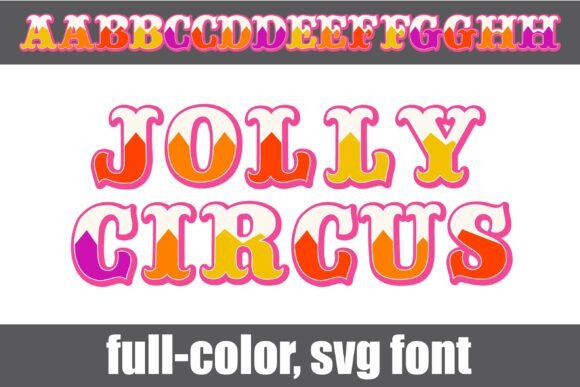
The moment Jolly Circus renders on screen, it communicates its intent clearly. This is a whimsical, crafty font designed specifically for circus and carnival aesthetics, but its application extends far beyond literal theme parks. As a color font, it brings built-in graphical elements—shadows, highlights, and texture—that would otherwise require hours of manual layering in Photoshop or Illustrator. For marketers working against tight deadlines, this efficiency is invaluable.
The visual style is bouncy and inviting. It doesn’t scream for attention in an aggressive way; instead, it invites the viewer in with a sense of fun and nostalgia. In my workflow, I found that using Jolly Circus as a primary headline instantly established a friendly, approachable tone. It works exceptionally well for brands that want to appear accessible and joyful. However, like any premium font, it has a specific voice. It is loud enough to be noticed but structured enough to remain readable, provided you use it correctly within your hierarchy.
Testing in Real-World Campaign Scenarios
To truly understand how this typeface performs, I integrated it into a multi-channel promotional campaign for a fictional seasonal sale. Here is how it behaved across different touchpoints:
- Social Media Graphics: On Instagram and Facebook feeds, where users scroll quickly, Jolly Circus stood out due to its vibrant color alternates. I used the alt case features to create dynamic text variations that kept the eye moving. The font’s inherent texture helped the graphic pop against both solid background colors and busy lifestyle photography.
- YouTube Thumbnails: Legibility is king in thumbnails. While Jolly Circus is decorative, its bold forms held up well at small sizes. I paired it with a clean sans serif font for the secondary text (like "50% OFF") to ensure the call-to-action remained crystal clear. The contrast between the whimsical headline and the functional subhead created a balanced visual hierarchy.
- Email Banners: Email clients can sometimes struggle with complex rendering, but because Jolly Circus is a color font, it generally displays consistently across modern platforms. For older clients, I exported the header as a PNG, which preserved the intricate details. The font added a celebratory feel to the email subject line preview, potentially increasing open rates by signaling excitement before the user even clicked.
- Pinterest Pins: Pinterest is a visual search engine. Jolly Circus worked beautifully as overlay text on vertical pins. Its playful nature aligns well with DIY, crafting, and lifestyle niches, making it a strong choice for content creators in those sectors.
Readability and Mobile Optimization
One common misconception about display fonts is that they are only for large formats. With Jolly Circus, however, I found that it performs surprisingly well on mobile devices, provided you respect spacing and scale. When designing for fast-scrolling feeds, every millimeter counts. The font’s natural kerning and weight distribution help prevent text from feeling cramped.
However, there are limits. Do not attempt to use Jolly Circus for body copy or long-form editorial design. The detailed strokes and color variations become muddy and difficult to parse when the text size drops below a certain threshold. It is strictly a display font meant for headlines, quotes, and short callouts. For supporting typography, I recommend pairing it with a neutral sans serif font or a simple serif font. This combination allows the whimsical nature of Jolly Circus to shine without overwhelming the reader. The clean lines of a modern typography system provide the necessary grounding that makes the decorative text look intentional rather than accidental.
Strategic Pairing Advice
When building a branded template pack or a consistent campaign look, consistency is key. Jolly Circus pairs best with minimalist designs. Let the font be the star. Avoid pairing it with other script fonts or handwritten fonts, as this creates visual clutter and competes for the viewer's attention. Instead, let the color font carry the emotional weight while your primary information font handles the data. This separation of roles ensures message clarity and enhances brand recognition.
Technical Considerations for Designers
Before dropping Jolly Circus into your client campaigns or digital products, there are practical aspects to review. First, check the included styles. Many modern fonts offer multiple weights or alternate characters that change the vibe slightly. Jolly Circus includes an alt case of additional colors for each letter, which adds depth but also increases file size. Ensure your delivery method supports color fonts (such as OpenType-SVG or COLR/CPAL formats) so that the richness is preserved.
Also, consider commercial licensing. If you are using this font for merchandise, paid advertisements, or client deliverables, verify the license terms. Some fonts restrict usage in resellable templates or require separate licenses for high-volume print runs. Understanding these boundaries protects your business and respects the creator’s work.
When Not to Use Jolly Circus
No single font fits every situation. Jolly Circus is ill-suited for formal corporate communication, legal disclaimers, or dense informational graphics. If your goal is to convey authority, seriousness, or precision, this whimsical typeface will undermine your message. It is also risky for dark backgrounds if the font’s default colors are light; always test contrast ratios to ensure accessibility compliance. Similarly, avoid using it for tiny text or image overlays where the details might get lost in compression artifacts.
Final Verdict for Campaign Designers
Jolly Circus is more than just a pretty face; it is a strategic asset for designers who need to communicate joy, energy, and creativity quickly. By leveraging its color font capabilities, you save time on graphic effects while maintaining a high-quality aesthetic. Whether you are launching an online course, promoting a webinar banner, or creating a series of engaging Instagram posts, this font adds a layer of polish that feels handmade yet professional. Just remember to pair it wisely, respect its limitations on readability, and let its unique personality do the heavy lifting in your visual storytelling.