Scary Smash: A Color Font for Editorial Impact
The deadline for the autumn newsletter graphic was looming, and I was staring at a blank canvas that felt entirely too quiet. The client wanted something that screamed "Halloween" without relying on the cliché orange-and-black gradient or the overused spiderweb textures. They needed personality. They needed a visual hook that would stop the scroll. That is when I stumbled upon Scary Smash, a full-color font that immediately shifted the entire mood of the project from generic to unforgettable.
As an editorial designer who spends half my life balancing readability with aesthetic flair, I am always hunting for typefaces that offer more than just letters. I look for rhythm, mood, and versatility. Scary Smash delivers exactly that. It is not merely a display font; it is a complete visual asset that brings a specific, playful, yet slightly macabre energy to any layout. In this post, I want to walk you through how I integrated this color font into a real-world design workflow, why it works so well for digital and print publications, and what you need to consider before dropping it into your own projects.
The Visual Personality of Scary Smash
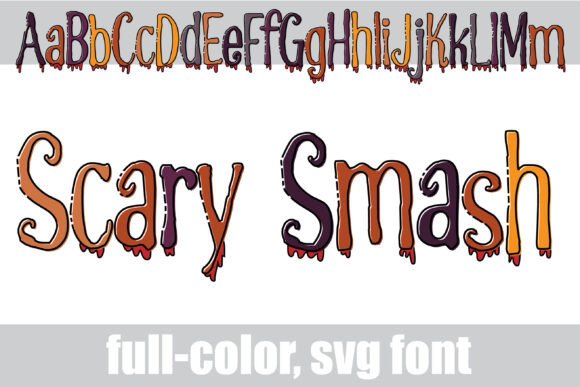
At first glance, Scary Smash is striking. It features an outlined structure filled with a Halloween-inspired color palette, accented by realistic drippy blood effects. But looking closer reveals why it is such a powerful tool for modern typography. The outline provides a structural backbone that keeps the characters legible even when surrounded by busy backgrounds, while the internal coloring adds depth and dimension that flat black text simply cannot achieve.
What makes this font particularly interesting for designers is its alt version. By accessing the character map in your system, you can unlock additional color variations. This feature transforms the font from a one-note seasonal gimmick into a dynamic design element. You can mix and match these colors to create custom headlines that feel bespoke rather than template-driven. The drips are not random; they follow the natural flow of gravity, adding a sense of motion and urgency that draws the eye downward—a crucial technique for guiding reader attention in long-form content.
Building a Cohesive Editorial Layout
I used Scary Smash as the primary header font for a lifestyle blog’s special October issue. The challenge was ensuring that the bold, colorful nature of the title did not overpower the body copy. To solve this, I relied on the principle of contrast. I paired Scary Smash with a clean, neutral sans serif font for navigation menus and captions, and a highly readable serif font for the main article text.
This pairing created a clear visual hierarchy. The eye lands on the dramatic headline first, captivated by the reds and blacks of the dripping effect. Then, the calmness of the serif body text allows the reader to settle in and consume the content comfortably. If I had used a similar display font for the paragraphs, the reading experience would have been fatiguing. Instead, Scary Smash serves its purpose perfectly: it grabs attention and sets the tone, then steps back to let the words do the work.
- Blog Headers: Use the font sparingly for weekly themes or seasonal spotlights to maintain brand consistency without overwhelming the logo.
- Ebook Covers: For horror-themed or spooky non-fiction, the full-color capability allows the cover to stand out in thumbnail sizes on Amazon or social media.
- Newsletter Graphics: Incorporate the font into email headers to increase open rates during holiday seasons. The visual distinctiveness helps your emails stand out in crowded inboxes.
- Printable Guides: When designing worksheets or planners with a festive theme, use the alt versions to add subtle decorative accents next to section dividers.
Readability and Technical Considerations
While Scary Smash is visually stunning, it is important to acknowledge its limitations. Like most creative fonts, it is best suited for short bursts of text. Using it for long paragraphs would compromise readability, especially on mobile devices where screen space is limited. The intricate details of the drips can become muddy if the font size is reduced too much. Therefore, I recommend using it for titles, subtitles, pull quotes, and section headings only.
Another critical aspect of working with color fonts is technical compatibility. Since Scary Smash is a Color Font, it relies on the operating system and application to render the multi-colored glyphs correctly. Most modern browsers and design software like Adobe Illustrator, Photoshop, and Affinity support this format. However, if you are exporting your designs to PDF for clients or customers, ensure that the color information is preserved. Embedding the font properly guarantees that the recipient sees the exact same vibrant colors and drip effects as you intended.
For those creating digital products like course materials or printable planners, test your layouts across different devices. What looks crisp on a desktop monitor might lose some detail on a smaller tablet screen. Scaling the font up ensures that the outlined structure remains sharp and the color fills remain solid. This attention to detail reinforces your professional identity and shows readers that you care about their experience.
Expanding Your Design Toolkit
Incorporating a premium font like Scary Smash into your workflow does more than just decorate a page; it elevates your brand identity. It signals that you are willing to invest in high-quality design assets that differentiate your content from competitors. Whether you are a blogger looking to refresh your archive, a publisher designing a magazine cover, or a creator selling digital downloads, having access to unique typefaces allows you to tell stories more effectively.
When selecting fonts for editorial design, always consider the emotional resonance of the typeface. Scary Smash evokes playfulness, suspense, and celebration. It fits naturally into contexts involving Halloween, horror, mystery, or even just a touch of whimsical darkness. By aligning your typography with the mood of your content, you create a subconscious connection with your audience. They feel the vibe before they even read the first sentence.
Before purchasing or downloading any font, take the time to review the license agreement. Understand whether the font allows for commercial use in templates, ebooks, and client projects. Check for included styles, ligatures, and multilingual support if your audience is global. Ensuring you have the proper rights protects your business and respects the hard work of the type designer.
Finalizing the Project
Returning to that initial newsletter design, the inclusion of Scary Smash transformed the final output. The subject line alone saw a significant uptick in opens compared to previous months, and feedback from subscribers mentioned that the graphics felt "fresh" and "exciting." The font did the heavy lifting of setting the scene, allowing the content to shine within a cohesive visual framework.
If you are looking to inject some personality into your next editorial project, consider exploring color fonts that offer both visual impact and functional versatility. Scary Smash is a testament to how thoughtful typography can enhance storytelling. It reminds us that fonts are not just containers for words; they are active participants in the narrative. By choosing the right typeface, you guide your reader’s journey, making every click, page turn, and scroll a more engaging experience.