Game Glitch Typeface: Adding Retro Playfulness to Editorial Design
I was sitting at my desk late last Tuesday, staring at a blank Canva canvas, trying to figure out how to make the header for my upcoming digital course on mindful productivity feel less like a corporate manual and more like a fun, engaging workshop. The topic was serious—focus, discipline, mental clarity—but I wanted the visual identity to feel approachable, energetic, and slightly nostalgic. That is when I stumbled upon Game Glitch.
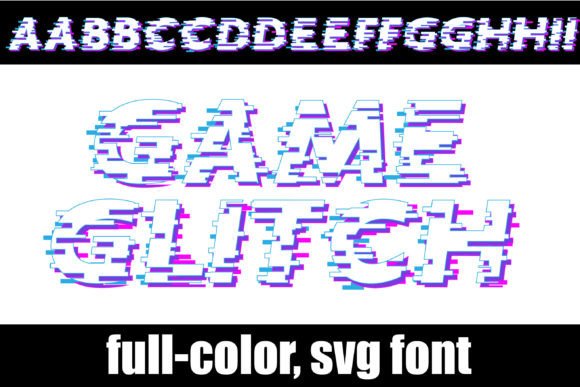
It wasn’t just about finding a font; it was about finding a voice. For years, I have relied on safe, sterile sans-serif fonts for my educational materials because they are clean and legible. But sometimes, clean feels cold. Sometimes, you need a typeface that winks at the reader. Game Glitch is exactly that kind of character. It is a full-color font that captures the whimsical, pixelated aesthetic of classic video games while maintaining enough structural integrity to be used in modern editorial layouts.
The Visual Personality of Game Glitch
When you first load Game Glitch into your design software, the immediate impression is one of playful disruption. Unlike standard monochrome fonts, this is a color font, which means the glyphs carry their own shading, highlights, and shadow details within the file itself. This adds a layer of depth that flat black text simply cannot achieve. The letters look like they have been rendered on an 8-bit screen, complete with subtle artifacts that suggest movement and energy.
The mood of the font is distinctly retro but not dated. It evokes the feeling of Saturday morning cartoons or early arcade cabinets, yet it pairs surprisingly well with contemporary minimalism. The rhythm of the letters is bouncy and irregular, breaking the monotony of traditional grid-based typography. For a blogger or publisher looking to inject personality into a layout without resorting to clutter, this balance is crucial. It provides visual interest without sacrificing the core function of communication.
Real-World Applications in Editorial Layouts
I decided to test Game Glitch in a few different contexts to see how it held up under real-world pressure. My primary project was redesigning the cover and chapter headers for a printable planner aimed at creative entrepreneurs. These users are often overwhelmed by information, so the design needed to be calming yet stimulating.
Blog Headers and Social Media Graphics
The most striking application I found was for blog headers and social media graphics. When I used Game Glitch for the main title of a post titled "How to Organize Your Digital Life," it immediately grabbed attention. Because it is a display font, it works best in large sizes. On a mobile screen, where space is limited, the bold, colorful nature of the letters ensures the headline stands out against white backgrounds or soft pastel images. It acts as a visual anchor, guiding the eye before the reader even processes the words.
Ebook Covers and Course Materials
I also experimented with using the font for ebook covers. Specifically, I designed a mock-up for a recipe ebook called "Pixel Perfect Pastries." The juxtaposition of the rustic concept of baking with the digital, glitchy aesthetic created a unique brand identity. It signaled to the reader that this content was modern, tech-savvy, and fun. However, I quickly learned that Game Glitch is not suitable for long-form body copy. Its decorative nature becomes fatiguing if used for paragraphs of text. Instead, I reserved it for chapter openers, pull quotes, and section headings.
Newsletter Graphics and Printable Guides
In my weekly newsletter, I use a lot of small icons and call-out boxes. Game Glitch proved excellent for these accents. By using it for key phrases like "Tip of the Week" or "Action Item," I could create a consistent visual cue that helped readers scan the email quickly. For printable guides, such as wedding checklists or coaching worksheets, the font added a touch of celebration. It transformed a mundane list into something that felt like a game to be completed, subtly encouraging engagement through gamification aesthetics.
Readability and Technical Considerations
While the aesthetic appeal is undeniable, any designer knows that form must follow function. When testing Game Glitch for screen reading, I noticed that its legibility drops significantly at smaller sizes. The pixelated edges and internal color variations can cause blurring on lower-resolution monitors or when scaled down too much. Therefore, I established a strict rule: never use Game Glitch for text smaller than 18 points unless it is purely decorative.
For mobile layouts, this limitation is particularly important. Readers on smartphones expect quick scanning. If a headline is too complex or visually noisy, it increases cognitive load. To mitigate this, I paired Game Glitch with a clean, highly readable sans serif font for subheadings and body text. This combination creates a strong visual hierarchy. The display font grabs attention, while the neutral body font ensures comfort during prolonged reading. This pairing strategy is essential for maintaining accessibility standards, ensuring that your content is inclusive for all users, including those with dyslexia or visual impairments.
Another technical aspect to consider is the file format. As a color font, Game Glitch relies on OpenType-SVG or COLR/CPAL tables to render correctly. This means it will appear in full color in modern design applications like Adobe Illustrator, Photoshop, and Affinity Designer. However, there is a caveat: if you export your document to a format that does not support color fonts, or if you view it in older software, the text may revert to black. For web use, you would need to convert the text to outlines or use specialized web font services that support color typography. Always check the licensing agreement to ensure you have the right to embed these advanced font features in your digital products.
Practical Font Pairing Strategies
To maximize the impact of Game Glitch, thoughtful pairing is non-negotiable. Here are some effective combinations I tested:
- Game Glitch + Lato: A robust sans serif that balances the playfulness of the display font with professional stability. Ideal for business coaches and consultants.
- Game Glitch + Merriweather: A serif font that adds a touch of editorial sophistication. Great for lifestyle blogs and magazine-style layouts.
- Game Glitch + Montserrat: A geometric sans serif that complements the pixelated geometry of the glitch effect. Perfect for tech-focused newsletters.
Avoid pairing Game Glitch with other decorative fonts, script fonts, or handwritten styles. The visual noise would become overwhelming, creating a chaotic reading experience. Let Game Glitch be the star, and keep the supporting cast simple and unobtrusive.
Building Consistency and Brand Identity
One of the most valuable aspects of using a distinctive font like Game Glitch is its ability to strengthen brand identity. In a crowded digital landscape, consistency is key. When every blog post, ebook cover, and social graphic uses the same playful, pixelated accent font, it creates a recognizable visual signature. Readers begin to associate that specific aesthetic with your content, building trust and familiarity over time.
This is especially powerful for independent creators and small publishers who do not have massive marketing budgets. Your typography becomes your billboard. By investing time in selecting and mastering a unique typeface, you elevate the perceived value of your work. It signals that you care about the details, that you understand design principles, and that your content is crafted with intention.
Ultimately, Game Glitch is more than just a novelty item. It is a versatile tool that, when used judiciously, can transform ordinary layouts into memorable experiences. Whether you are designing a wedding guide, a digital magazine, or a simple newsletter, allowing yourself to experiment with personality-driven typography can breathe new life into your projects. Just remember to prioritize readability, respect the limitations of color fonts, and always let the content shine through the design.