Celebrate Green: A Color Font for Dynamic Web Design
In the world of digital design, whitespace is precious. Every pixel on a landing page or app screen must earn its place by driving engagement, clarity, or conversion. As web designers and UI creators, we are constantly searching for tools that add visual interest without sacrificing readability or load speed. This is where Celebrate Green enters the workflow. It is not just another decorative typeface; it is a sophisticated color font designed to inject personality into modern digital experiences while maintaining the structural integrity required for professional web layouts.
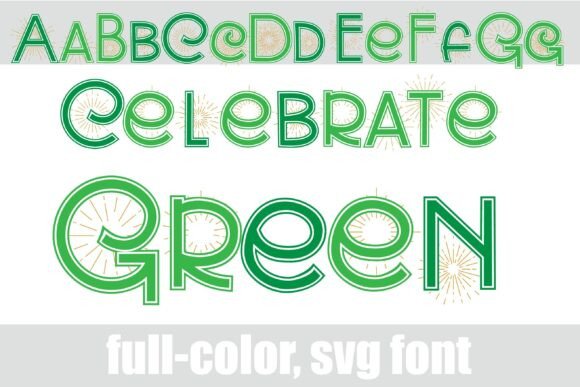
This full-color sans serif font features celebratory starbursts integrated directly into the letterforms. For digital product creators, this means you can achieve complex graphic effects without relying on heavy image files or CSS overlays that might slow down your site. By leveraging the power of Color Fonts, Celebrate Green allows you to maintain a consistent online identity with minimal technical overhead. The font includes an alt version accessible through your system’s character map, offering additional colors for all letters. This flexibility is crucial for creating dynamic brand-focused web experiences where tone shifts from playful to professional depending on the section.
Visual Hierarchy and Brand Tone in Digital Spaces
One of the biggest challenges in web design is establishing a clear visual hierarchy. Users scan content rather than reading every word. A well-chosen display font like Celebrate Green can guide the eye immediately to key information. Because the font incorporates vibrant, multi-colored elements within the glyphs themselves, it naturally draws attention. This makes it an excellent choice for hero sections, promotional banners, and call-to-action areas where you need to capture interest instantly.
The sans serif structure ensures that the text remains legible even when scaled up for large headers. However, the decorative starburst details add a layer of sophistication that pure geometric fonts often lack. This balance supports a brand tone that is both approachable and polished. For example, a coaching website or a creative portfolio can use Celebrate Green in the main headline to convey energy and creativity, while relying on a neutral body font for the detailed content. This contrast creates a rhythm that keeps users engaged as they scroll through your content sections.
When used correctly, this font enhances brand trust. Inconsistent typography can make a site feel amateurish, whereas a cohesive typographic system signals professionalism. Celebrate Green fits seamlessly into a modern typography stack. Its clean lines ensure that it pairs well with simple sans serif fonts for body copy, allowing the decorative elements to shine without overwhelming the reader. This strategic pairing is essential for editorial design and long-form content, where readability is paramount.
Ideal Use Cases for Web Layouts
While Celebrate Green is versatile, its impact is maximized when applied strategically. Here are specific scenarios where this font excels in a digital context:
- Hero Sections: Use short, punchy phrases in large sizes. The starbursts will act as natural accents, replacing the need for separate graphic icons or illustrations.
- Landing Page Headers: For SaaS founders or marketers, the font can highlight unique selling propositions. The colorful variations allow you to emphasize specific keywords within a sentence, guiding the user’s focus toward conversion points.
- E-commerce Banners: Online store owners can use Celebrate Green for sale announcements or new arrival tags. The festive yet modern aesthetic works well for boutique brands looking to stand out in a crowded market.
- Digital Product Covers: If you sell templates, courses, or digital assets, this font adds immediate value to your preview images. It communicates quality and attention to detail before the user even clicks through.
- Social Media Graphics: For consistent branding across platforms, using the same font in your social media graphics reinforces your visual identity. The alt versions provide enough variety to keep your feed fresh without breaking the theme.
Readability and Technical Considerations
As designers, we must prioritize usability. While decorative fonts can be tempting, they risk reducing accessibility if overused. Celebrate Green strikes a careful balance. The underlying sans serif skeleton ensures that the characters remain distinct and recognizable. However, designers should avoid using the full color version for small body text or dense paragraphs. Instead, reserve it for headlines, subheads, and short phrases. This approach preserves scanning behavior and ensures that your content remains accessible to all users, including those using screen readers or assistive technologies.
Responsive design adds another layer of complexity. On mobile screens, space is limited, and text needs to be crisp. When testing Celebrate Green on smaller devices, check how the starburst details render at different breakpoints. You may need to adjust line height or letter spacing to prevent the colorful elements from clashing with adjacent text. Dark backgrounds can enhance the vibrancy of the colors, making the font pop against deep navy or black hex codes. Conversely, light backgrounds work well for a softer, more airy aesthetic suitable for lifestyle blogs or wellness brands.
It is also important to consider font pairing. Since Celebrate Green is a display font, it should be paired with a reliable, neutral typeface for supporting typography. A clean sans serif font works best for body copy, ensuring that the detailed letterforms of Celebrate Green do not compete with the informational content. Avoid pairing it with other script fonts or handwritten fonts, as this can create visual chaos. The goal is harmony, where the decorative font acts as the accent and the body font provides the foundation.
Implementation and Licensing
Before integrating Celebrate Green into your projects, verify the included styles and file formats. Modern web design often requires WOFF2 formats for optimal performance. Check if the font supports webfont embedding to ensure it displays correctly across different browsers. Additionally, explore the character map to understand the range of alt versions available. These alternate colors can be used to create custom gradients or to match specific brand palettes without needing external design software.
Commercial licensing is a critical step for any digital product creator. Ensure you have the appropriate rights to use Celebrate Green for client projects, online stores, and digital templates. Most premium fonts require separate licenses for web usage versus desktop usage. Understanding these terms protects your business and respects the work of the type designer. Whether you are building a single-page landing site or a comprehensive brand kit, having the correct license allows you to use the font confidently across all your design assets.
Ultimately, Celebrate Green is more than just a pretty typeface. It is a functional tool for enhancing digital communication. By understanding its strengths in visual hierarchy, brand tone, and technical implementation, you can create web experiences that are not only beautiful but also effective. In an era where attention spans are short, giving your typography the right amount of flair can make all the difference in capturing and retaining your audience’s interest.