Creative Classroom: A Color Font for Engaging Digital Experiences
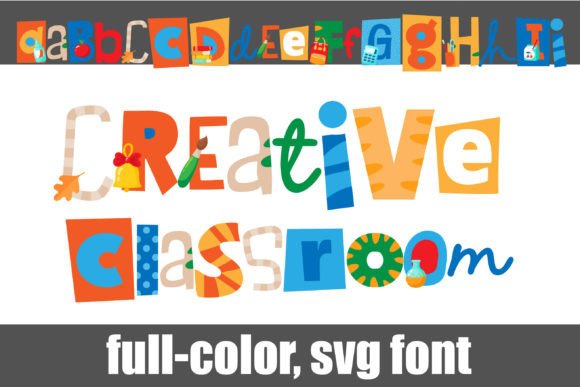
In the fast-paced world of web design and digital product creation, typography is rarely just about legibility. It is about personality, hierarchy, and immediate emotional connection. As designers who build landing pages, app interfaces, and brand-focused websites, we know that a single typeface can shift the entire tone of a project. This is where Creative Classroom enters the conversation. As a vibrant color font featuring school supplies throughout its glyphs, it offers a unique opportunity to inject playfulness and creativity into digital layouts without sacrificing professional polish.
Understanding the Visual Personality of Creative Classroom
Creative Classroom is not a standard monochrome typeface. It is a color font, which means each character contains embedded graphical elements—in this case, delightful illustrations of pencils, rulers, books, and other educational tools. This makes it an exceptional choice for brands that want to communicate creativity, learning, or approachability. The alt case provides additional colors accessible through your system’s character map, allowing you to customize the visual impact directly within your design software.
From a UI perspective, this font behaves like a display asset rather than body copy. Its visual density and illustrative nature demand attention. When used correctly, it creates an instant focal point. For a creative portfolio or a boutique online store selling art supplies, Creative Classroom serves as more than text; it acts as a decorative graphic element that reinforces the brand narrative before the user even reads the content.
Strategic Placement in Web Layouts
One of the most common mistakes with decorative fonts is overuse. To maintain readability and visual hierarchy, Creative Classroom should be deployed strategically. It excels in areas where you need to capture interest quickly:
- Hero Sections: Use Creative Classroom for the main headline on a landing page. The colorful, supply-filled letters will draw the eye immediately, setting a fun and inviting tone for the visitor.
- Call-to-Action (CTA) Areas: While full buttons might become cluttered, using the font for short phrases like "Start Learning" or "Shop Now" can add a playful nudge that encourages clicks, especially in ed-tech or creative niches.
- Section Headers: Break up long-form content by using Creative Classroom for subheadings. This helps guide the user’s scanning behavior, making the page feel less like a wall of text and more like an engaging journey.
- Banners and Promotional Graphics: For social media graphics or email headers, this font adds instant visual weight. It works beautifully for announcing new course launches or seasonal sales.
However, avoid using it for navigation menus, footers, or small interface labels. The intricate details of the school supplies can become muddy at smaller sizes, leading to poor accessibility and a loss of clarity. Reserve the font for large-scale applications where every detail can be appreciated.
Readability and Responsive Design Considerations
Digital design requires rigorous testing across devices. Because Creative Classroom is a display font with complex internal graphics, its performance on mobile screens needs careful consideration. On high-resolution retina displays, the color details remain crisp, but on lower-density screens, the fine lines of the pencil or ruler icons might blur.
To ensure a consistent online identity, test the font against various backgrounds. On light backgrounds, the colors pop effectively. On dark backgrounds, ensure there is sufficient contrast between the font colors and the background to maintain legibility. If placing text over images, use a solid overlay or drop shadow to separate the text from the busy background, preventing visual chaos.
When designing for conversion-focused layouts, clarity is king. If the primary goal is to convey information quickly, pair Creative Classroom with a clean, neutral sans serif font for supporting text. This combination allows the decorative font to handle the emotional appeal while the simple typeface handles the functional data.
Font Pairing for Modern Typography
Effective font pairing is crucial when integrating a creative font into a broader design system. Since Creative Classroom is highly expressive, it pairs best with minimalist typefaces that do not compete for attention.
- Sans Serif Companions: Pairing Creative Classroom with a geometric sans serif like Helvetica Neue, Montserrat, or Open Sans creates a balanced contrast. The neutrality of the sans serif grounds the whimsy of the color font, making the overall design feel modern and structured.
- Editorial Serifs: For a more sophisticated look, consider pairing with a classic serif font. This combination works well for high-end coaching websites or premium course platforms, suggesting that while the content is fun, it is also authoritative and trustworthy.
Avoid pairing it with other script fonts or heavily stylized typefaces. The result would likely be overwhelming and difficult to read, detracting from the user experience. The goal is to let Creative Classroom shine as the star, supported by understated typography.
Building Brand Trust Through Consistent Identity
In the realm of digital products, consistency builds trust. Using Creative Classroom across multiple touchpoints—such as a website header, email newsletters, and PDF workbooks—creates a cohesive brand identity. For SaaS founders in the education sector or bloggers in the DIY niche, this consistency signals professionalism mixed with approachability.
The font’s ability to change color via the alt case allows for dynamic branding. You can adjust the palette to match seasonal campaigns or specific product lines without losing the core typographic identity. This flexibility is invaluable for marketers looking to keep their visual assets fresh and relevant.
Licensing and Technical Implementation
Before implementing Creative Classroom in client projects or commercial products, always review the licensing terms. As a commercial font, it typically requires a license for web embedding, desktop use, and potentially app integration. Ensure you have the appropriate rights for your specific use case, whether it is a personal blog or a large-scale e-commerce platform.
Technically, verify the file formats provided. Most modern color fonts support WOFF2 for web use, ensuring fast load times and broad browser compatibility. Check if the font includes all necessary weights and styles. While Creative Classroom is primarily a display asset, having access to its full character set ensures you can utilize the alt cases effectively across different design contexts.
Final Application Ideas
Imagine a portfolio site for a graphic designer. Using Creative Classroom for the name and tagline instantly communicates creativity. Or picture a landing page for an online art workshop, where the font’s inherent imagery reinforces the subject matter. In these scenarios, the font does the heavy lifting of storytelling, allowing the design to remain clean and focused.
Ultimately, Creative Classroom is a powerful tool for digital creators who want to break away from the monotony of standard black-and-white typography. By understanding its strengths and limitations, you can leverage its unique charm to create web experiences that are not only visually striking but also emotionally resonant. Whether you are designing a simple blog header or a complex e-commerce funnel, this color font can add that extra layer of personality that turns visitors into engaged users.