Pixelcraft Pumpkin: A Pixel-Perfect Typeface for Seasonal Handmade Brands
I was sitting at my desk, surrounded by half-cut vinyl rolls and a stack of blank candle jars, trying to find the perfect text style for my new autumn collection. I wanted something that felt nostalgic and cozy but also modern enough to stand out in a crowded Etsy feed. That’s when I opened Pixelcraft Pumpkin. It wasn’t just another decorative font; it was a complete mood shift for my design workflow. As a maker who spends hours tweaking mockups and testing print quality, finding a typeface that balances charm with technical precision is rare. This full-color font brings an instant sense of warmth and creativity to any project, making it an essential addition to your digital asset library.
The Visual Personality of Pixelcraft Pumpkin
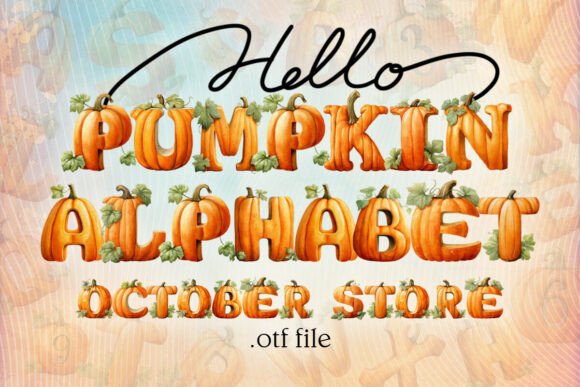
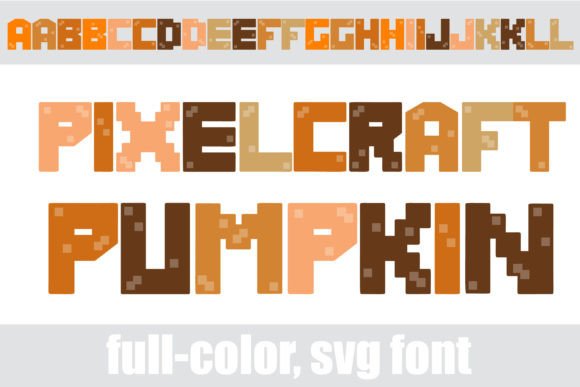
At first glance, Pixelcraft Pumpkin looks like a playful nod to retro gaming, but its true power lies in its sophisticated autumn color palette. The letters are constructed with a pixelated grid that feels deliberate and crisp, yet the warm hues—think burnt orange, deep brown, golden yellow, and soft cream—soften the edges. It avoids the harshness sometimes associated with blocky fonts. Instead, it feels inviting, like a cup of spiced cider on a porch swing.
What makes this Color Font truly special is the alt case accessible through your system’s character map. These alternate characters introduce additional colors and subtle variations that allow you to create dynamic, multi-colored text without needing complex graphic design software. For handmade sellers, this means you can achieve vibrant, eye-catching typography directly from your word processor or cutting machine software. The visual personality here is distinct: it’s cheerful, seasonal, and undeniably crafty. It captures the essence of fall harvest while maintaining a clean, professional aesthetic suitable for boutique branding.
From Digital Mockups to Physical Products
I decided to test Pixelcraft Pumpkin immediately on a few key products. First up were my soy candle labels. Usually, I struggle to make pixel fonts look good on curved glass, but the high contrast of the colored pixels against the matte kraft paper background worked beautifully. The font’s bold presence ensured readability even from a distance, which is crucial for shelf appeal.
Next, I moved to stationery. I designed a set of greeting cards featuring pixel-art pumpkins and leaves alongside the main headline using Pixelcraft Pumpkin. Because it is a display font, it shines brightest in short phrases rather than long paragraphs. I used it for titles like "Hello Fall" and "Harvest Moon," letting the colorful alternates do the heavy lifting. The result was a card set that felt cohesive and premium. Customers often comment on how "finished" a product looks, and typography plays a huge role in that perception. Using a unique, well-designed typeface like this elevates your brand identity, signaling to buyers that you pay attention to detail.
Optimizing for Cutting Machines and Stickers
For Cricut and Silhouette users, Pixelcraft Pumpkin offers unique opportunities. While standard pixel fonts are often monochrome, the color features allow for layered designs if you choose to separate the hues manually. However, for single-layer vinyl cuts, the black-and-white outlines (if available in the base file) provide excellent stability. When designing stickers, I found that keeping the text relatively large ensured the tiny pixel details didn’t get lost during the weeding process. Small sticker sheets benefit from this font when used for headers or badges, adding a pop of color that draws the eye immediately.
When preparing files for physical merchandise like tote bags or mugs, remember that screen colors don’t always match print. Pixelcraft Pumpkin’s rich autumn tones translate well to heat transfer vinyl and sublimation, provided you calibrate your printer correctly. The font’s geometric structure holds up well under heat, preventing the "bleed" effect that can ruin finer script fonts on fabric.
Font Pairing and Layout Strategy
No matter how beautiful a display font is, it needs support. Pixelcraft Pumpkin works exceptionally well when paired with a clean sans serif font for body text. I recommend using a simple, legible typeface for descriptions, ingredients, or contact information on your product labels. This creates a strong visual hierarchy: the eye is drawn to the playful, colorful Pixelcraft Pumpkin headline first, then naturally flows down to the practical details.
For wedding invitations or elegant printable wall art, pairing this font with a delicate handwritten script can create a charming contrast. Imagine a rustic farmhouse sign where the main title is in Pixelcraft Pumpkin, framed by thin, elegant lines. The juxtaposition of the structured pixels with organic script elements adds depth and sophistication to your design assets. Avoid pairing it with other busy or ornate fonts, as this can create visual clutter. Simplicity is key to letting Pixelcraft Pumpkin shine.
Readability and Commercial Licensing
While Pixelcraft Pumpkin is fantastic for titles, logos, and decorative wording, it is not recommended for long-form text. The pixelated style can become fatiguing to read over multiple sentences. Reserve it for impactful moments: book covers, social media graphics, packaging design, and web design headers. Always check the included styles and weights before purchasing. Ensure the file format matches your needs, whether you are working in Adobe Illustrator, Photoshop, or Canva.
Crucially, verify the commercial font licensing terms. If you plan to sell physical products, templates, printables, or SVG-style designs, you need the appropriate license to use the typeface commercially. Many creators overlook this step, risking legal issues later. Pixelcraft Pumpkin is designed for creative professionals, so understanding its usage rights ensures your handmade business remains compliant and secure. Look for multilingual support if you cater to diverse audiences, ensuring all characters render correctly across different systems.
Elevating Your Shop Branding
In the world of handmade goods, consistency builds trust. By incorporating Pixelcraft Pumpkin into your shop branding—from your listing images to your thank-you cards—you create a recognizable visual language. Buyers begin to associate that specific pixelated charm with your name. Whether you are creating planner pages, holiday tags, or seasonal craft kits, this font adds a layer of emotional appeal that resonates with customers looking for warmth and authenticity.
Don’t be afraid to experiment with the alt cases. Mixing colors within a single word can add a festive touch to birthday invitations or baby shower decor. The flexibility of Color Fonts allows you to update your designs quickly without starting from scratch. As a maker, efficiency is valuable. Being able to generate vibrant, on-brand text with minimal effort means more time spent on production and less time on design hurdles. Pixelcraft Pumpkin is more than just a font; it’s a tool that helps tell your brand’s story, one pixel at a time.